Range-aware motion warping: an attack lands at striking distance and never stretches past the distance its animation was authored to travel.
GAS · Combat · Unreal Engine 5
A 200cm lunge should never travel 2000cm.
Motion Warping distorts root motion to land on a target, which keeps weight shift and foot planting the way an interpolated SetActorLocation never does. What it has no opinion about is how far. CrimsonMotionWarping wraps the engine's math so its skew never receives a target outside the animation's authored intent.
Why CrimsonMotionWarping
Your existing montages and Motion Warping notifies keep working unchanged. The plugin simply computes a better warp target, and tells you exactly how it got there.
Reach as a multiplier, not a distance
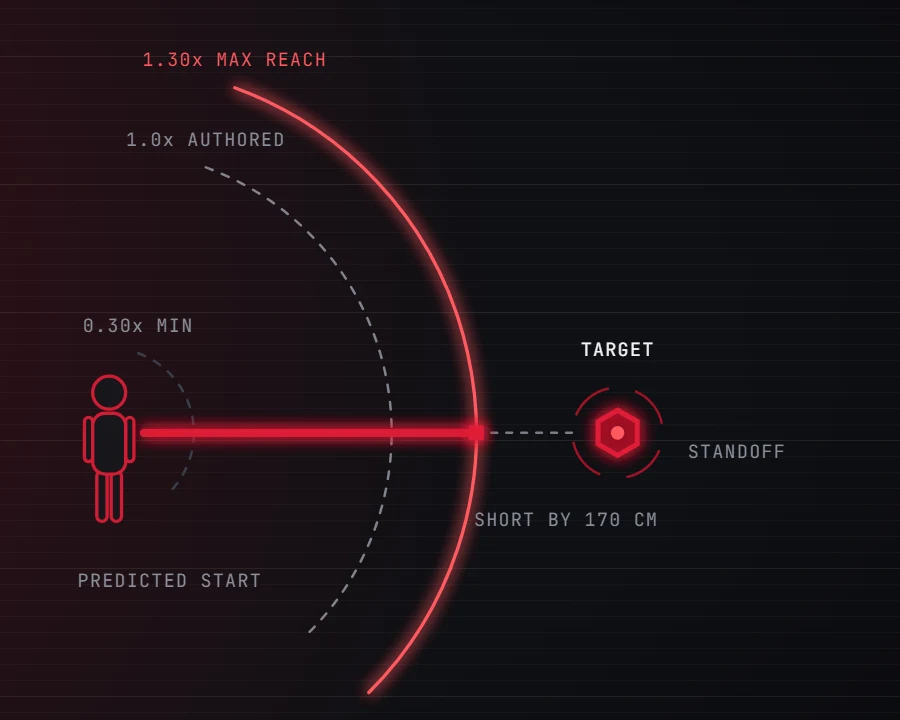
Scale Band bounds an attack as a multiple of what its warp window was authored to travel, (0.30, 1.30) by default. Swap a 500cm lunge for a 300cm one and every threshold moves with it. Want centimetres? Use Explicit Reach Override.
One profile for a rat and a boss
The character stops short by both capsule radii plus a Contact Offset, read at runtime. A 200cm-wide boss is approached from further out automatically, so a single profile asset serves every enemy size with no per-enemy data to author.
The typo that logs nothing, caught three ways
A mistyped warp target name is invisible in stock Motion Warping: the montage plays unwarped, nothing is logged above Verbose, and it never re-enables. Here it is a Blueprint compile error, an asset validation error, and a runtime warning.
Client picks who, server picks how far
The owning client reports its target on the ability's target data channel, keyed to the prediction key so it can never race the activation. The server validates it against its own reach: it keeps the client's direction and imposes its own distance.
Turns that commit, in seconds you set
The engine spreads rotation across the whole warp window, which reads as lazy drift on a long attack. Max Turn Seconds drives a constant rate from the angle actually left; 0.15 to 0.25 reads as snappy. Untick Face Target to close the gap without turning.
Rings you can see, numbers you can read
Crimson.MotionWarping.Debug 1 draws the range model in-world: lower bound, authored travel, upper bound and standoff ring, the path coloured by outcome, a labelled shortfall when clamped. DevTools opens a live PIE inspector with the last derivation and a server versus client comparison.
A closer look
Distance-to-target is not distance-to-travel
Take a 500cm lunge and two 40cm capsules. A target at 250cm needs neither the authored 500cm, which sails past it, nor the raw 250cm, which ends up inside it. It travels the 170cm gap.
- Stock Motion Warping invites you to get this wrong; here it is the default
- One asset stops correctly against any target, with no per-attack distance to maintain
Measured from where you will be
The engine captures a modifier's start when its window opens, not when the ability activates. On a montage with a wind-up step, measuring from the current position measures from an origin the character will never occupy.
- The plugin predicts the window-opening position from the montage's pre-window root motion
- The asset validator warns when a montage travels more than 50cm before its window opens
Out of range is a decision, not an accident
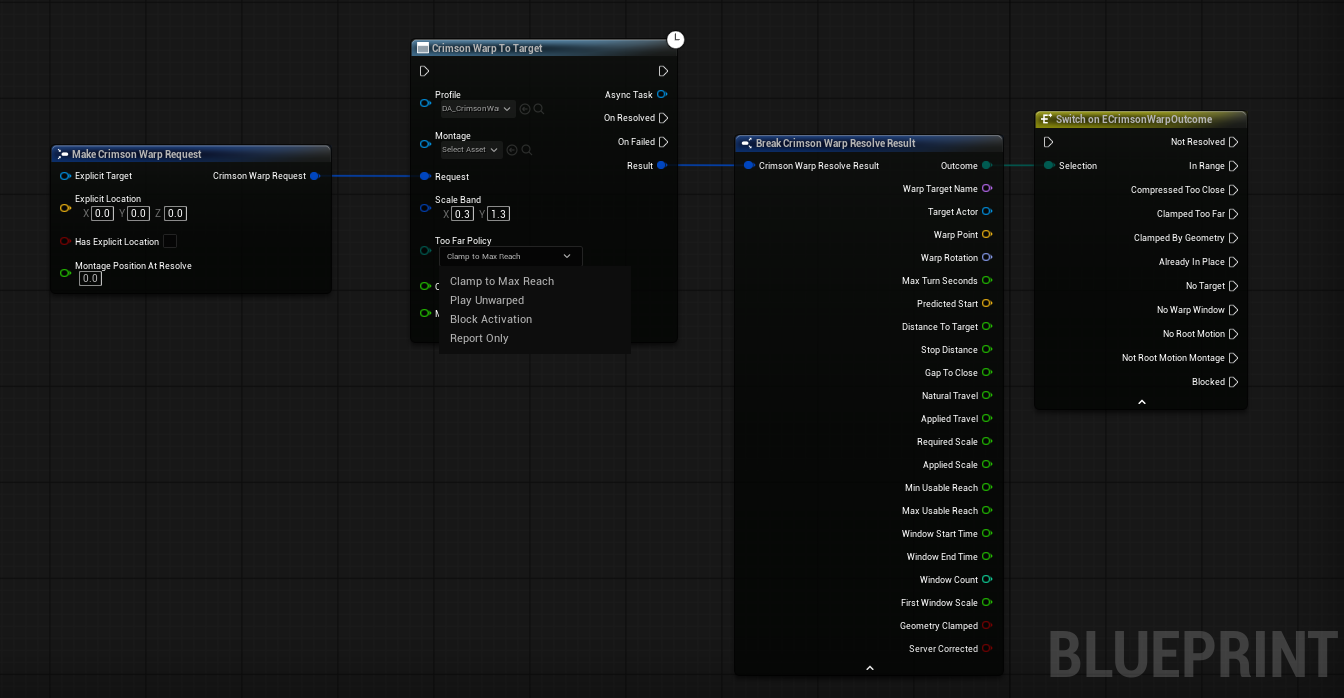
Too Far Policy decides what happens when a target sits beyond the band. Every activation reports an outcome, so a graph branches on it instead of guessing.
- Clamp and fall short, play as authored, block activation, or report only and warp like stock
- Swept against
World Staticgeometry, so the clamp is identical on every machine and stops at a wall - Outcomes:
ClampedTooFar,CompressedTooClose,ClampedByGeometry,AlreadyInPlace,Blocked
One provider, a different answer per attack
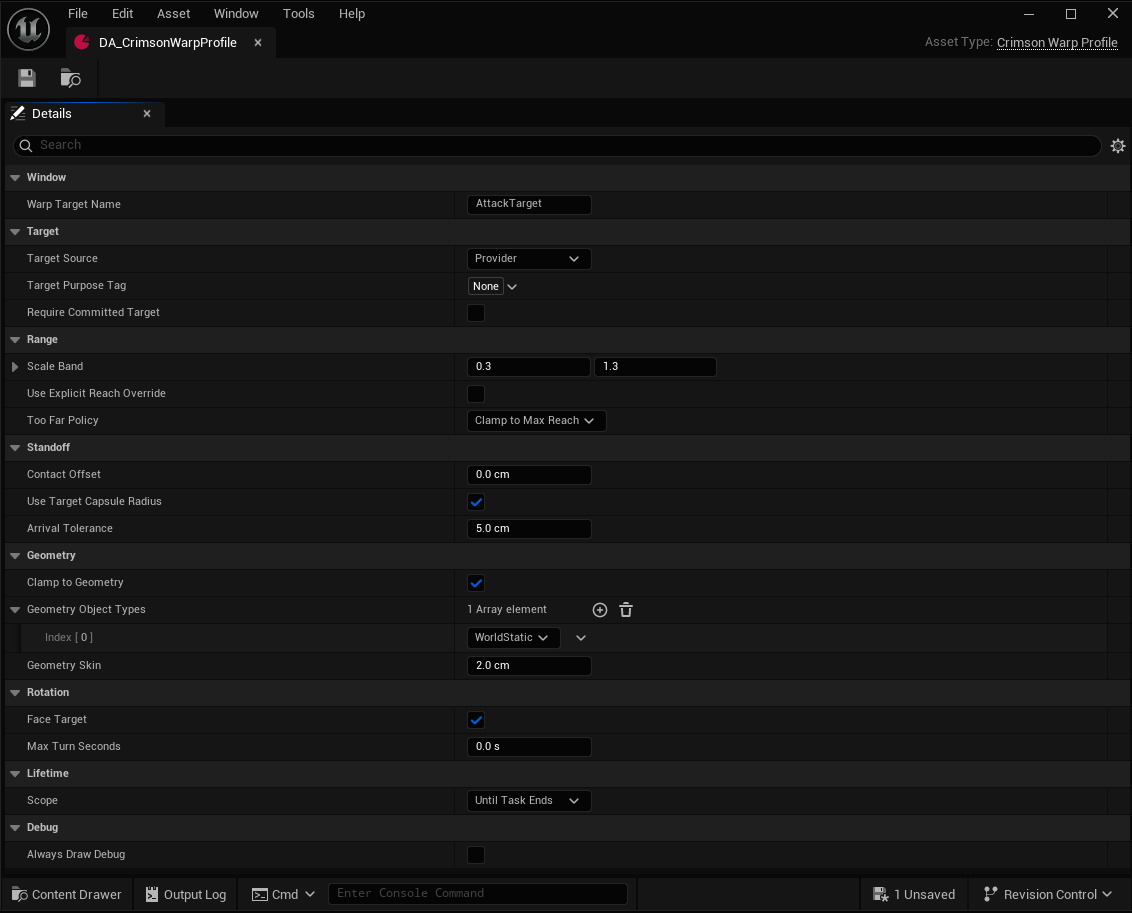
A profile carries a Target Purpose Tag that is handed to the provider. Five ship (melee, ranged, dash, finisher, traversal), so one targeting component answers a lunge and an execution differently.
Require Committed Targetignores a soft-tracked target and warps only toward a deliberate lockTarget Sourcepicks the provider, an explicit target passed on the node, or either order of the two
One attack, one number, no duplicate asset
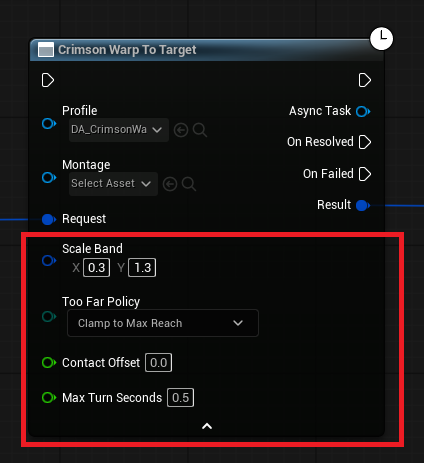
Crimson Warp To Target grows an Advanced pin for every profile property tagged ExposeOnWarp, seeded from the chosen asset. Touch one and only that value changes for this activation. The asset stays the source of truth.
- Overrides land on a per-activation copy, so one ability can never re-tune every attack sharing the profile
- Untouched pins are skipped at compile time
Preview Resolveruns the decision without planting anything: ask whether an attack would reach before committing
Technical details
- Engine
- UE 5.8
- Tested platforms
- Windows
- Blueprint-ready
- Yes
- C++ required
- No
- Network replicated
- Yes
- Dependencies
- MotionWarping, GameplayAbilities, GameplayTasks, GameplayTags, DeveloperSettings, DataValidation
Frequently asked questions
Does it replace Unreal's Motion Warping?
Do I need C++ to use it?
ExposeOnWarp metadata, and Blueprint variables cannot carry C++ metadata. A Blueprint subclass of UCrimsonWarpProfile can add its own variables and use every pin already exposed on the base class, but a new pin of its own needs the C++ tag.Does it work on any pawn?
ACharacter owners only, and that is a hard limit rather than a gap. Unreal only builds a warping adapter for ACharacter, and the character adapter is the only one that reconstructs correctly during client prediction replay. A non-character pawn logs an error and the component stays inert.Does it work in multiplayer?
Local Predicted for anything a player triggers. Under Server Only the owning client never runs the task, plays the montage unwarped and is corrected by movement instead, and the plugin warns when it sees that. Keep Geometry Object Types on World Static so the collision clamp stays deterministic, and test on a dedicated server: a listen server host is both authority and locally controlled, so it never takes the path that matters.Where do targets come from?
ICrimsonWarpTargetProvider, an interface this plugin owns and you can implement in Blueprint on the pawn or any component; when an actor carries several, the highest priority wins and ties break on object name so every machine picks the same one. Or pass a target explicitly by setting Target Source to Explicit.Does it depend on other Crimson plugins?
ICrimsonWarpTargetProvider. With CrimsonCore, the free integration layer from the Crimson Discord, every ModularGameplay receiver pawn automatically gets a provider that answers with its CrimsonCamera lock-on target.Stop slingshotting players across the arena
A montage window, a profile, a component and one node. The Quick Start gets one attack warping onto a target end to end, then hands you range rings and a live inspector for everything after that.
Pricing
CrimsonMotionWarping is sold on Fab under Epic’s two standard licenses. Both include the full plugin, source, and updates.
Completes your setup
Each Crimson plugin runs standalone, so add only what your game needs:
Data-driven hit detection for melee, area, hitscan and projectiles.
- GAS Target Data
- Interpolated Sweeps
- Composable Filters
- Hit Zones
- Pool-Ready Projectiles
A full Gameplay Ability System layer for UE5.
- Custom ASC & Abilities
- Slot-Based Augments
- Modifiers & Phases
- Graph-Based Combos
Mode-stacked, data-driven camera system with smooth blends.
- Stackable Camera Modes
- Runtime Push/Pop
- Smooth Blends
- Blueprint-Authored