Data-driven combat hit detection for melee swings, area attacks, hitscan and projectiles: one profile asset, every attack shape, GAS target data out.
GAS · Combat · Unreal Engine 5
Author the attack once. It hits correctly everywhere.
Given a shape, a moment in time and a filter policy, which actors were hit? CrimsonHitDetection answers that identically for a sword swing, a shockwave, a hitscan shot and a projectile, so an attack becomes a data asset instead of a hand-rolled swept trace in every ability.
Why CrimsonHitDetection
Built on Epic's Gameplay Targeting System, server-authoritative by construction, and deliberately report-only.
One asset per attack
A UCrimsonHitProfile holds the targeting preset, dedup policy, per-window and per-query target caps, query rate and impact cue tag. Reuse it across every ability that should hit the same way, and get a Data Validation error if the preset can never resolve anything.
Sweeps that don't miss
A weapon tip can travel metres between frames; one overlap misses everything it passed through. Socket Sweep and Actor Sweep sweep from the previous query, sub-stepping when the distance exceeds the shape radius, so dropping to 30 Hz halves trace cost almost for free.
Composable filters, not hardcoded rules
Eight filter tasks plus a sort: affiliation, actor class, angle, line of sight, target tag query, max distance, require-ASC and require-hurtbox, composing freely with Epic's own. Geometry is a selection task; validity is a filter task.
No client-initiated RPCs
Shape queries, filtering, dedup and target limits all run server only, so there is no trust boundary to police and no _Validate surface. A separate unreliable multicast carries cosmetic impacts, so effects still land promptly on every machine that can see the fight.
Pool-ready, replicated projectiles
ACrimsonProjectile handles pierce counting, homing, max range and lifetimes. Only the server detects; launch state replicates once and clients fly their own copy, fast-forwarded by the spawn delay. Its pooling hooks work with any pool; with CrimsonCore, CrimsonObjectPool recycles it automatically.
The stale-bone trap, fixed for you
Servers don't refresh off-screen bones unless Always Tick Pose And Refresh Bones is set: every socket answers from the reference pose and the swing hits nothing. It looks like a replication bug. The plugin sets it while a window is open, then restores it.
A closer look
Windows, not frames
A hit window is the period during which queries run, opened by an animation notify or an ability task. It owns what makes a swing one attack instead of independent frames: the already-hit set, the target budget and the positions the sweep interpolates from.
- Once Per Window for a swing, Once Per Interval for burning ground, Every Tick when you accumulate yourself
- Every window carries a safety timeout, because an interrupted montage can skip its end event
Head shots, without damage maths
Each impact reports a zone tag (Body, Head, Limb, Weakpoint, Armored), and the plugin assigns no meaning to any of them. What a head shot is worth stays your decision.
- Zones come from a physical material on a physics-asset body, or from bone mappings on a hurtbox component
- Hurtbox lookup walks up parent bones, because physics bodies routinely report a child bone like the jaw
- Only swept queries report a zone: an area overlap carries no impact point, bone or physical material
Vary an attack without a second asset
Pick a Hit Profile on an ability task node and it grows a pin for each value the preset's tasks expose: radius, trace length, arc, max distance. Wire a skill rank into radius, or a charge alpha through a Lerp.
- Every request gets its own copy of the preset
- Shipped Crimson tasks already expose theirs; on a task you wrote it is one
ExposeOnTargetingmarker - Pins are compiled into the graph, so a C++ caller gets the preset's authored values instead
Shape Scaleis a uniform multiplier that is C++-callable and also drives montage-triggered attacks
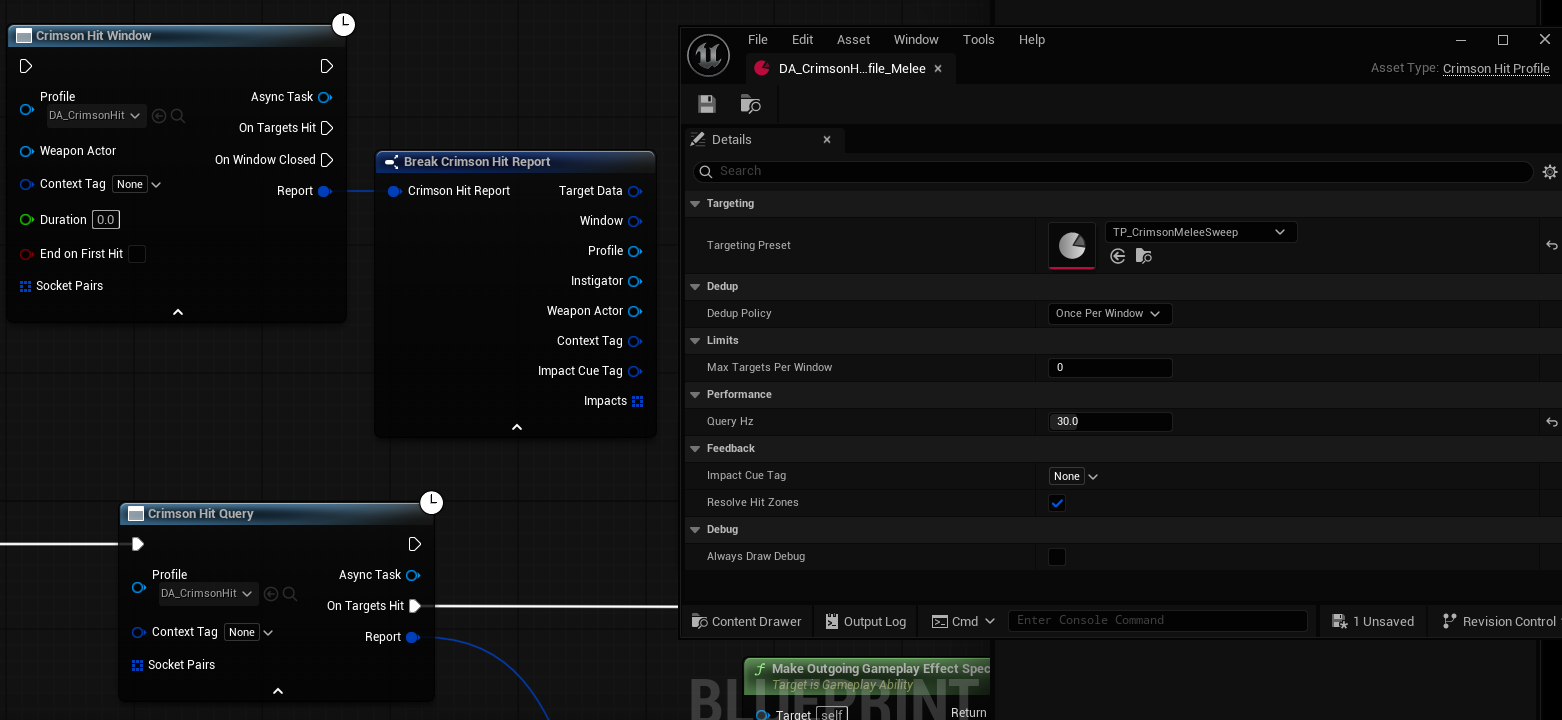
Start from a worked example, not a blank asset
Tick Show Plugin Content and /CrimsonHitDetection/Examples/ holds one targeting preset per attack shape, each paired with a Hit Profile, plus an example projectile Blueprint waiting for a mesh. Only the melee preset needs editing, because no shipped asset can guess your weapon's socket names.
TP_CrimsonMeleeSweep,TP_CrimsonAreaSphere,TP_CrimsonHitscan,TP_CrimsonProjectileSweep, plusBP_CrimsonProjectile_Example- Area, hitscan and projectile geometry derives from the source actor and is drop-in
Technical details
- Engine
- UE 5.8
- Tested platforms
- Windows
- Blueprint-ready
- Yes
- C++ required
- No
- Network replicated
- Yes
- Dependencies
- GameplayAbilities, TargetingSystem, GameplayTasks, GameplayTags, DeveloperSettings, PhysicsCore, AIModule, NetCore
Frequently asked questions
Do I need the Gameplay Ability System?
FGameplayAbilityTargetDataHandle and the window drivers are UAbilityTask nodes. There is no non-GAS path, so if your project doesn't use GAS this plugin isn't usable as-is.Do I need C++ to use it?
Blueprintable, so you can override its direction, length and swept dimensions in a Blueprint subclass. A couple of keyed-window entry points are C++-only, for callers like an animation notify that cannot hold a handle, and you won't call them directly. Pooling projectiles without CrimsonCore also takes C++, because the pool reclaims them through the native OnPoolReleaseRequested delegate. One honest catch is downstream of us: Crimson Filter: Affiliation asks the engine's IGenericTeamAgentInterface, and UGenericTeamAgentInterface is not Blueprintable, so the actors that get hit need a small C++ base class implementing it. Use Crimson Filter: Actor Class instead if you have no team system yet, or derive from CrimsonCore's ACrimsonCharacter, which already implements it.Does it apply damage?
FCrimsonHitReport and stops: it never builds or applies a UGameplayEffect and never executes a GameplayCue, it just carries the cue tag for you to fire. Effect specs get modified between construction and application by stat systems, augments and buffs; applying them from inside a detection system would silently bypass all of it and double-fire cues your own effect already carries.Does it work in multiplayer?
Do I have to enable the Gameplay Targeting System myself?
.uplugin, so enabling CrimsonHitDetection enables it too, even though Epic ships it disabled by default. It will show as enabled in Edit → Plugins without you having ticked it.Does it depend on other Crimson plugins?
IGenericTeamAgentInterface, so it works with CrimsonTeams or any team system that implements it, but read How-To: Filter By Team before shipping either way, because unresolved team data reads as Neutral and the filter allows Neutral by default. The failure mode is hitting your own allies, not an error.One profile asset. Every attack shape.
Melee swings, shockwaves, hitscan shots and projectiles resolved by the same system, on the server, with the arc measured from when the swing started. The Quick Start walks a swung weapon end to end.
Pricing
CrimsonHitDetection is sold on Fab under Epic’s two standard licenses. Both include the full plugin, source, and updates.
Completes your setup
Each Crimson plugin runs standalone, so add only what your game needs:
A full Gameplay Ability System layer for UE5.
- Custom ASC & Abilities
- Slot-Based Augments
- Modifiers & Phases
- Graph-Based Combos
Motion warping that lands attacks at striking distance.
- Authored Reach Band
- Capsule-Aware Standoff
- Turn-Speed Cap
- Compile-Time Validation
- Server-Validated Warps
Tag-based teams & factions with dynamic attitude.
- Tag-Based Teams
- Dynamic AI Re-Aggro
- GAS Target Filtering
- Team Colors
- Multiplayer Dev Tools
Actor pooling with an explicit acquire and release API.
- Replicated-Safe Pooling
- Frame-Budgeted Spawns
- Per-Class Capacity
- Bypass Switch