A mode-stacked, data-driven camera. Push and pop blendable modes for third-person, top-down, first-person and 2D side-scroller views, with hard and soft lock-on and no per-frame camera code.
Gameplay · Camera · Unreal Engine 5
Compose your camera. Don't code it every frame.
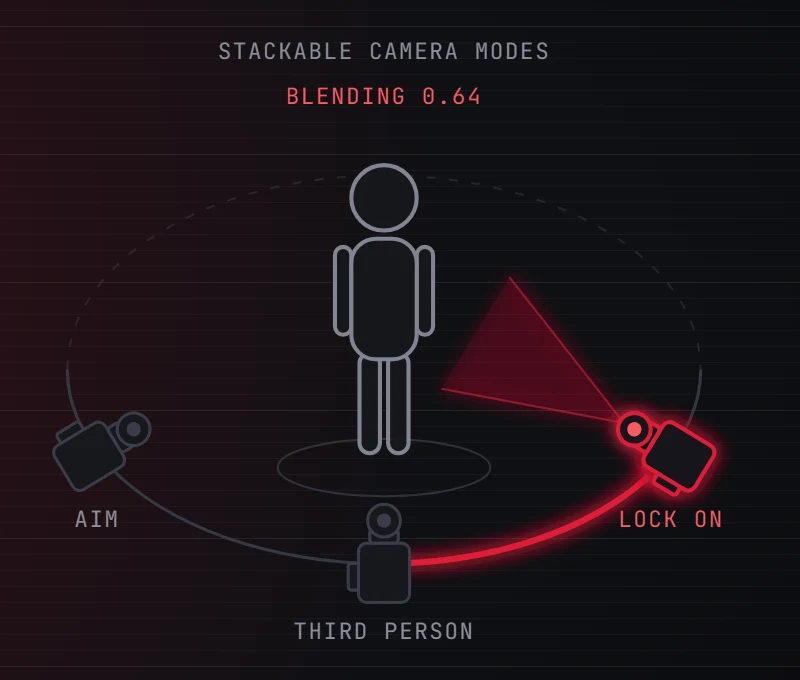
Push modular camera modes onto a blend stack and the runtime blends them by weight: third-person to top-down to first-person, with no tick-camera code. Shoulder framing, zoom, lag, recenter, shake, occlusion fade and a multi-lock-point lock-on ship in the box.
Why CrimsonCamera
A complete, data-driven camera layer: composable modes, four perspectives out of the box, the polish games ship with, and a Souls-style lock-on.
A mode stack that blends
Push and pop UCrimsonCameraMode classes; the stack blends them by weight every frame. Third-person to aim to lock-on is a smooth transition, not a hard cut, and per-mode state survives the switch.
Four perspectives, built in
Third-person, top-down, first-person and 2D side-scroller ship ready to push, with offset curves, penetration avoidance, socket eye, deadzone framing and look-ahead included. Subclass one to tune it, or use it as-is.
Shoulder, zoom, lag & recenter
Shoulder framing and dolly zoom live on the component, so they carry across every mode you switch to. View lag and idle auto-recenter are tuned per mode, and both are off by default.
Two answers to a wall in the way
Penetration avoidance is on by default: weighted feelers pull the boom in before the view clips into geometry. Or fade instead: tagged occluders dither out through the plugin's own material and restore themselves.
Lock-on, hard and soft
A multi-lock-point hard lock on Unreal's Gameplay Targeting System, plus opt-in soft lock that tracks the screen-center-most enemy. Retune targeting by reordering tasks, with no recompile, and cycle a boss's weak points.
Local by design
Everything runs on the locally-controlled pawn and replicates nothing. The one opt-in exception is pawn facing, mirrored to the server so simulated proxies turn the same way.
A closer look
A following camera in five steps, zero tick code
Point your PlayerController at the Crimson camera manager, add the camera component to your pawn, subclass the third-person mode and push it once on BeginPlay. No spring arm, no per-frame camera logic.
Switch views by pushing modes
Push a tag-keyed override when aiming, mounting or a cutscene starts, and pop the same tag when it ends. Most-recently-pushed wins, so independent systems never clobber each other.
- Override
Determine Camera Modeto pick the base view from game state - Every mode carries a
Camera Type Tag, so your pawn reacts without naming a camera class On Camera Mode Changedfires when a mode tops the stack, not after the blend: input never waits
Souls-style lock-on, fully data-driven
Author a targeting preset and a lock-on config, drop a component on the player and a lockable one on targets, bind input. Indicators work immediately: a default widget ships, already pointed at by the project setting.
- Several lock points per actor, so players cycle a boss's weak spots
- Soft lock-on is the same pipeline without the takeover, with a dwell time so the pick cannot flicker
Get Current Lock On Targethands attacks the hard target if locked, the soft one otherwise- Depends only on the Targeting System, with team filtering optional and never a dependency
Walls dither out, and put themselves back
Drop a Crimson Camera Occlusion Component on the pawn and tag the geometry you want to fade. Tagged occluders dither out through the bundled fade material and restore themselves the moment they stop blocking. Nothing on the occluder is ever edited.
- Untagged walls stay solid
- Swap the look in one project setting, or per pawn with
Fade Material Override Set Occlusion EnabledandSet Occlusion Fade Strengthare ready for an options menu- A local material effect that never touches the network
The camera declares how the pawn faces, or writes nothing at all
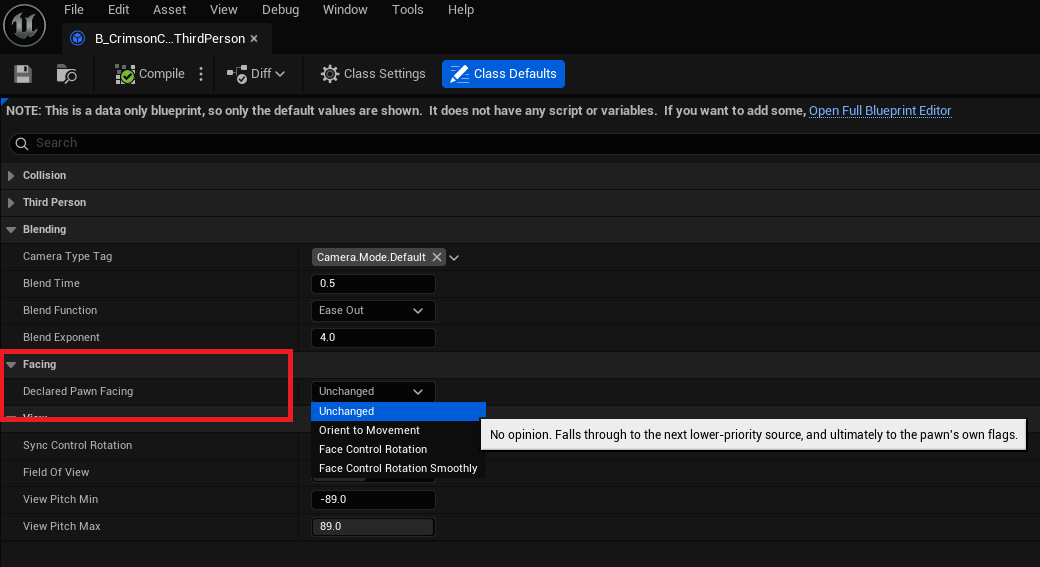
Set Declared Pawn Facing on a camera mode and it wins whenever that mode is on top, so a lock-on camera strafes while a top-down camera stays free. Out of the box the plugin writes no movement flag at all.
- Gameplay pushes a higher-priority facing override and clears it after; the previous mode is restored
- Leave every declaration
Unchangedand your Character Blueprint keeps owning its rotation flags - Only the first-person mode ships declaring
FaceControlRotation
Technical details
- Engine
- UE 5.8
- Tested platforms
- Windows
- Blueprint-ready
- Yes
- C++ required
- No
- Network replicated
- No
- Dependencies
- TargetingSystem, GameplayTags, UMG, DeveloperSettings
Frequently asked questions
Do I need C++ to use it?
UCrimsonUICameraManagerComponent), the DetermineCameraModeDelegate selection delegate (Blueprint overrides the Determine Camera Mode event instead), and the one-frame AddFieldOfViewOffset. Any of them wraps in a single BlueprintCallable function on your own class.Does it work in multiplayer?
Does it depend on other Crimson plugins?
ECrimsonPawnFacing and FCrimsonLockOnTargetInfo. Your gameplay code reads the target with Get Current Lock On Target and pushes modes or facing on the component directly. Lock-on additionally uses Unreal's first-party Gameplay Targeting System, which enabling the plugin turns on for you; note Epic still marks that plugin Experimental. Everything except lock-on works without it.Is the lock-on hard to set up?
Can players tune the camera from an options menu?
0 clears it back to each mode's authored FOV), an occlusion on/off plus fade strength, live lag and auto-recenter setters on the active mode, and a per-player screen-shake scale. That shake scale is worth knowing about: the Crimson camera manager installs its own shake modifier, so one slider scales every shake the player receives, including Play World Camera Shake, camera shake source components and Sequencer shake tracks, not just shakes this plugin played. What it does not ship is a settings store or an options UI; those stay yours, and FOV, shake scale and occlusion live on pawn-owned components, so re-apply them after a new pawn is possessed.Why won't my target lock on?
Crimson.Camera.DevTools in the console during PIE and the inspector answers it directly: a Targets tab listing every candidate with per-filter pass/fail and its screen-center rank, a Lock-On tab showing what Get Current Lock On Target resolves to right now, a Camera tab with the active mode and blend weights, and a Preset tab that puts the hard and soft presets side by side and flags a soft preset missing its Frontal Cone filter, which is the reason soft lock latches onto enemies behind you.What does CrimsonCore add?
Give your game a camera that blends
Set the manager, add the component, push a mode, and you have a smooth third-person camera with no tick code. Then layer in shoulder, zoom, occlusion fade and lock-on. Start with the Quick Start or follow the course.
Pricing
CrimsonCamera is sold on Fab under Epic’s two standard licenses. Both include the full plugin, source, and updates.
Completes your setup
Each Crimson plugin runs standalone, so add only what your game needs:
Tag-driven Enhanced Input with GAS ability binding.
- Ability Input Binding
- Per-Player Rebinding
- Settings Modifiers
- Input Clash Analyzer
A full Gameplay Ability System layer for UE5.
- Custom ASC & Abilities
- Slot-Based Augments
- Modifiers & Phases
- Graph-Based Combos
Motion warping that lands attacks at striking distance.
- Authored Reach Band
- Capsule-Aware Standoff
- Turn-Speed Cap
- Compile-Time Validation
- Server-Validated Warps