Data-driven game mode composition. An Experience asset lists the Game Feature plugins to activate and the actions to run, so what a match, a lobby or a front end is *made of* is authored as data, and adding a system to a mode never means editing that mode's C++.
Free · Framework · Unreal Engine 5
Stop writing a GameMode per mode.
An Experience is a data asset that says what a session is made of: the Game Feature plugins to activate and the UGameFeatureActions to run, driven on the server and clients. Swapping a match for a lobby means pointing at a different asset, not writing a different AGameMode. Free.
Why CrimsonExperience
The machinery: assets, manager component, policy and ready signal. Your GameMode shrinks to *choosing* an experience.
Composition, not inheritance
A UCrimsonGameFeatureAction_AddInventory does not know a skill tree exists; an Experience that lists both gets both. The experience holds TArray<UGameFeatureAction*> and nothing more specific, so UCrimsonExperienceDefinition has no include from any gameplay plugin, which lets you own three Crimson plugins and still use experiences.
A replicated load state machine
Unloaded → Loading → LoadingGameFeatures → ExecutingActions → Loaded. The server assigns the experience; the property is ReplicatedUsing, so each client runs its own load rather than being told the result, and a client joining in progress still gets a fully applied experience.
A ready signal that can't be missed
Actors begin play before actions run, so anything an experience sets up doesn't exist in BeginPlay. Every registration path is call-or-register: if the experience already loaded, your callback fires immediately rather than never. Blueprint gets Wait For Experience Ready; C++ gets three priority tiers.
Action sets kill the copy-paste mode
Most modes share the same HUD, inventory wiring and input. A UCrimsonExperienceActionSet holds that shared block, so a new mode is the shared set plus its differences instead of a copy that drifts. Actions run experience-first, then each action set in array order.
Modes the player can actually pick
UCrimsonUserFacingExperienceDefinition is the presentation of an experience: tile title, subtitle, icon, map, max players. GetTravelOptions() and GetAdvertisementName() feed whatever session system you use, and GetAllFrontEndExperiences fills a mode list in one Blueprint node. With CrimsonCore, one call builds the hosting request.
PIE with several instances behaves
UCrimsonExperienceManager is an engine subsystem that reference-counts Game Feature plugin activation across PIE worlds, so one instance finishing never deactivates a plugin another still needs. It requires no setup; it exists so multi-instance PIE behaves like separate processes.
A closer look
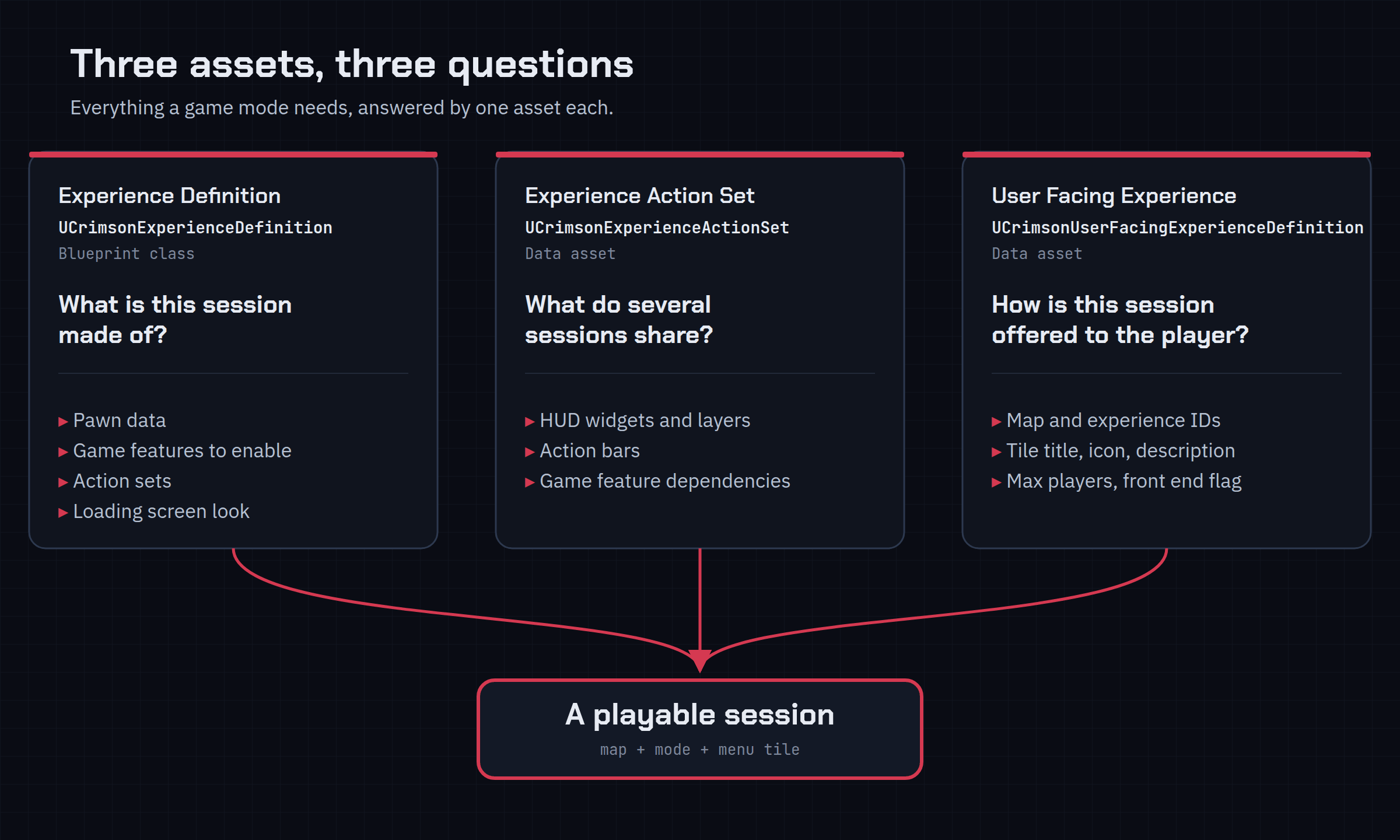
Three assets, three questions
UCrimsonExperienceDefinition (a Blueprint class) answers what is this session made of. UCrimsonExperienceActionSet (a data asset) answers what do several sessions share. UCrimsonUserFacingExperienceDefinition answers how is this session offered to the player. Nothing else needs explaining before you can ship a mode.
Pawn data stays yours
DefaultPawnData is typed as UCrimsonPawnDataBase, a base class that declares no properties at all. The empty base keeps the reference typed without the coupling; your game mode casts back down to the concrete type it owns.
- Real pawn data aggregates ability sets, input configs and camera modes from several plugins
- Typing the property as that would drag every one of them into this plugin's dependencies
Test a slow load without a slow machine
Two console variables insert a delay before actions run. Set the minimum to three seconds and the loading screen holds three seconds longer before anything the experience adds appears, so you see what your players on cold storage see.
crimson.chaos.ExperienceDelayLoad.MinSecsand.RandomSecs- An experience's
LoadingScreenblock styles its loads through CrimsonCore or your ownOnRequested()listener
Technical details
- Engine
- UE 5.8
- Tested platforms
- Windows
- Blueprint-ready
- Yes
- C++ required
- Yes
- Network replicated
- Yes
- Dependencies
- GameFeatures, ModularGameplay, GameplayTags, UMG, DeveloperSettings, NetCore
Frequently asked questions
Do I need C++ for this one?
SetCurrentExperience takes an FPrimaryAssetId and is server-only, so it is C++ only: your game mode calls it once, after the game state exists. IsExperienceLoaded and GetCurrentExperienceChecked are C++ only too. Everything else is reachable from Blueprint: the experience assets are Blueprint classes, Wait For Experience Ready is a Blueprint async node, and the whole front-end surface (GetAllFrontEndExperiences, GetDefaultFrontEndExperience, GetTravelOptions) is BlueprintCallable.Does it ship a GameMode I have to inherit from?
AGameStateBase subclass at UCrimsonExperienceManagerComponent and your own AGameModeBase at an experience id. The Quick Start walks exactly that, and nothing in your inheritance chain changes.What setup does it need beyond enabling the plugin?
AlwaysCook; you only tell it which folders to scan, in Project Settings → Crimson → Crimson Experience → Asset Discovery → Primary Asset Scan Paths. That part matters: an experience is reached through an FPrimaryAssetId, which the cooker does not follow, so an experience outside a scanned folder loads fine in the editor and is simply missing from the package. The Game Features subsystem still has to be pointed at UCrimsonGameFeaturePolicy, and that one does live in Config/DefaultGame.ini. Quick Start step 2 is both, verbatim, and you do not need PrimaryAssetTypesToScan entries any more; leaving old ones in would register each type twice.Which actions come with it?
UCrimsonGameFeatureAction_SplitscreenConfig, which turns splitscreen off for the duration of an experience. Add Inventory, Add Teams, Add Abilities, Add Equipment Slots, Add Crimson Skill Tree, Add Crimson Action Bars and Add Widget are shipped by the plugins that own those systems; they appear in the Actions picker when those plugins are installed. That inversion is the whole design: this plugin never learns what an inventory is.Why is my component missing in BeginPlay?
ExecutingActions, so a component, widget or ability grant an action creates does not exist yet. Register a callback instead: from Blueprint, Wait For Experience Ready; from C++, one of the three priority tiers. Code that must not depend on this plugin can wait on the Crimson.Experience.Loaded feature state the manager raises on the GameState, on the server and every client.It's free. What's the catch?
One experience loading in a level, from nothing
The Quick Start hosts the manager component on your game state, aims a game mode at an experience id, and fires a node the moment the experience is live. Action sets and a pickable front end are one how-to further.
Ready for more? Add a premium system
Every premium system runs on its own, so add only the ones your game needs.
Keybound, paged action bars over a replicated binding store.
- Automatic Stance Pages
- Pluggable Providers
- Server-Validated Edits
- Layout Editor
- UI-Agnostic Snapshots
Layout-agnostic, fully replicated inventory with bags and containers.
- Pluggable Topology
- Runtime Constraints
- Scoped Containers
- No RPCs to Write
A full Gameplay Ability System layer for UE5.
- Custom ASC & Abilities
- Slot-Based Augments
- Modifiers & Phases
- Graph-Based Combos