MMO-grade action bars as data: keybound, paged, server-authoritative layouts over the plugin's own slot binding store, with a per-slot state snapshot any widget can read. Abilities, items and macros share one bar, and the bar knows none of those words.
Gameplay · Action Bars · Unreal Engine 5
The hotbar problem, solved once, for every kind of thing a player can put on a key.
The data, input and state layer behind an MMO hotbar: keybound bars, pages that flip themselves for stances and vehicles, a saved, server-authoritative binding store, and a per-slot snapshot any widget binds to. Abilities and macros work out of the box; items plug in through your container or CrimsonCore.
Why CrimsonActionBar
Binding, validating, paging, resolving and polling are done. The widget on top stays yours.
One store, every view over it
Bindings live in the plugin's own UCrimsonSlotBindingComponent: server-authoritative, delta-replicated owner-only, SaveGame all the way down. A picker, a spellbook and a bar page pointed at the same LayoutId show the same bindings: one truth per player, not one per widget.
Pages that flip themselves
A page with an ActivationQuery wins while the owner's tags match (bear form, stealth, a vehicle), above the player's manual pages. Server and client compute the page from the same replicated inputs, so a stance change flips the bar with no round trip.
Providers make anything bindable
A slot stores which provider understands it plus an opaque payload. Providers ship for gameplay abilities, container-owned objects (items, gear, mounts), macro sequences and tags (emotes, pings, markers fired through OnTagChosen). Add your own by subclassing one class, in Blueprint or C++.
A real layout editor, not a properties list
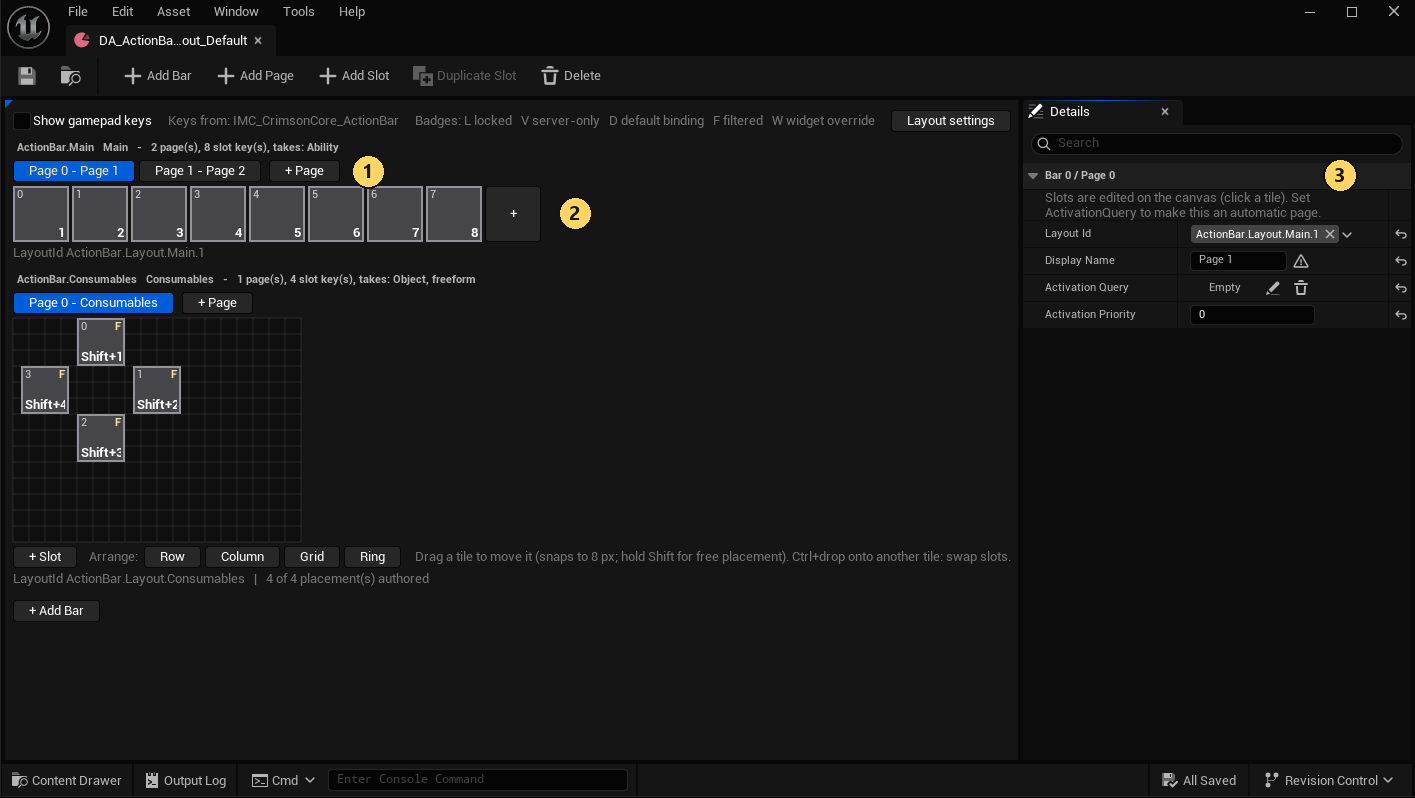
Double-click the layout asset and the Action Bar Layout Editor opens: every bar drawn as tiles at each slot's real size and position, each with its live key. Drag to reorder, + to add slots, pages and bars; validation issues clear as you fix them.
Identity, not pointers, so saves survive
Payloads carry an FCrimsonSlotBindingIdentity, not a pointer. Bind Healing Potion, not this stack: drink the last one, buy more, and the slot finds the new stack when your container resolves by definition. A binding whose thing is gone goes stale: grayed, kept, re-resolved every poll.
A PIE dev-tools harness for the whole thing
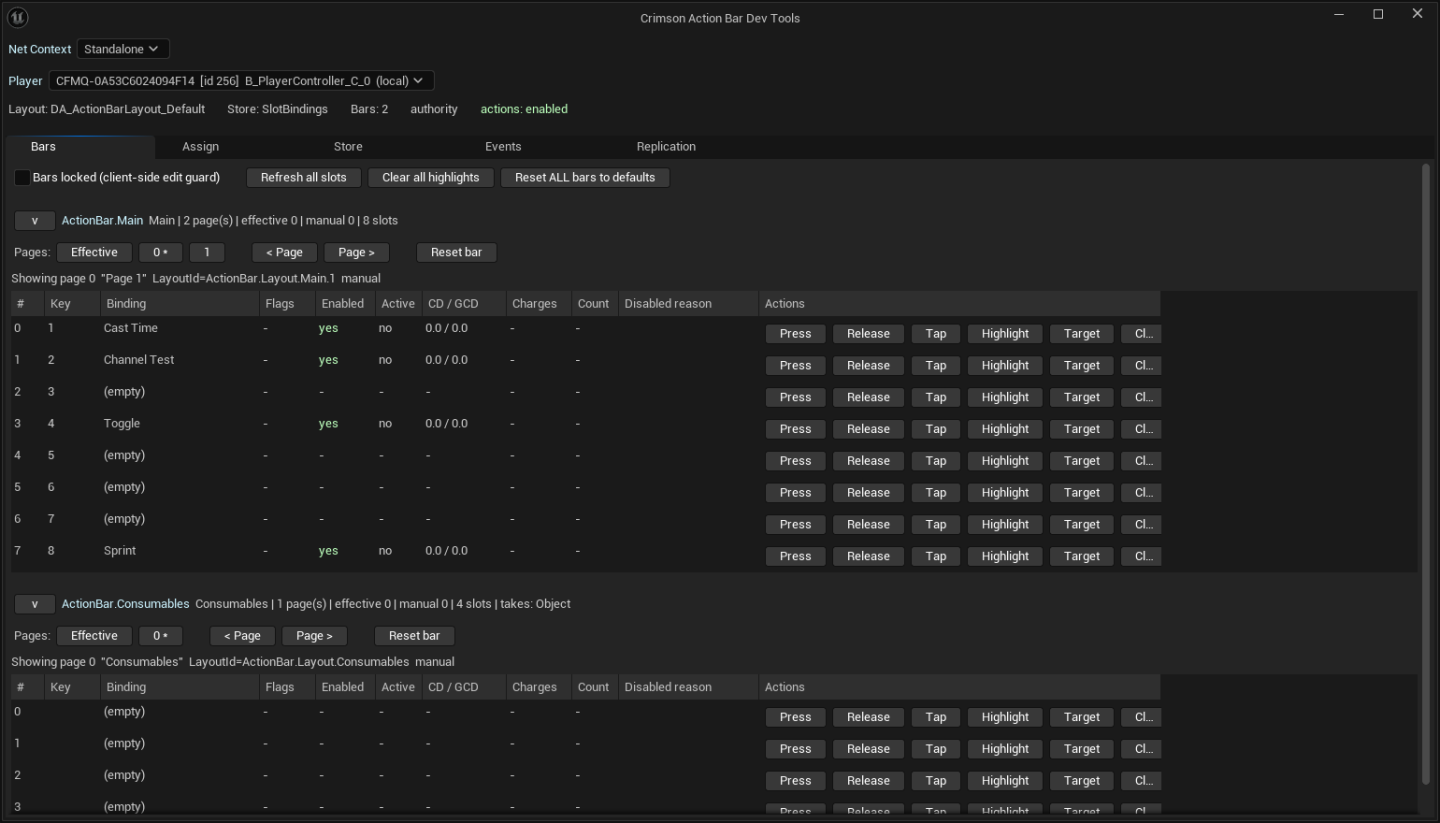
The Action Bar Dev Tools panel (Crimson.ActionBar.DevTools) runs during PIE: pick the net context, pre-flight and assign, press/clear/highlight/page any slot, and diff server against client. From a client context every mutating button goes through the real RPC, so it doubles as the multiplayer test harness.
A closer look
Author bars where you can see them
The layout asset is bars → pages → slots, and the editor draws it at the real geometry: the selected tile on the canvas at its true size with its real key badge, its properties in the Details pane.
+adds slots, pages and bars; drag reorders; validation issues clear as you fix them- Tiles are neutral by design: the slot widget owns its material and colours, never the asset
- Canvas and HUD place slots through the same
ResolveSlotPlacement, so the preview's layout is the game's
A bar does not have to be a row
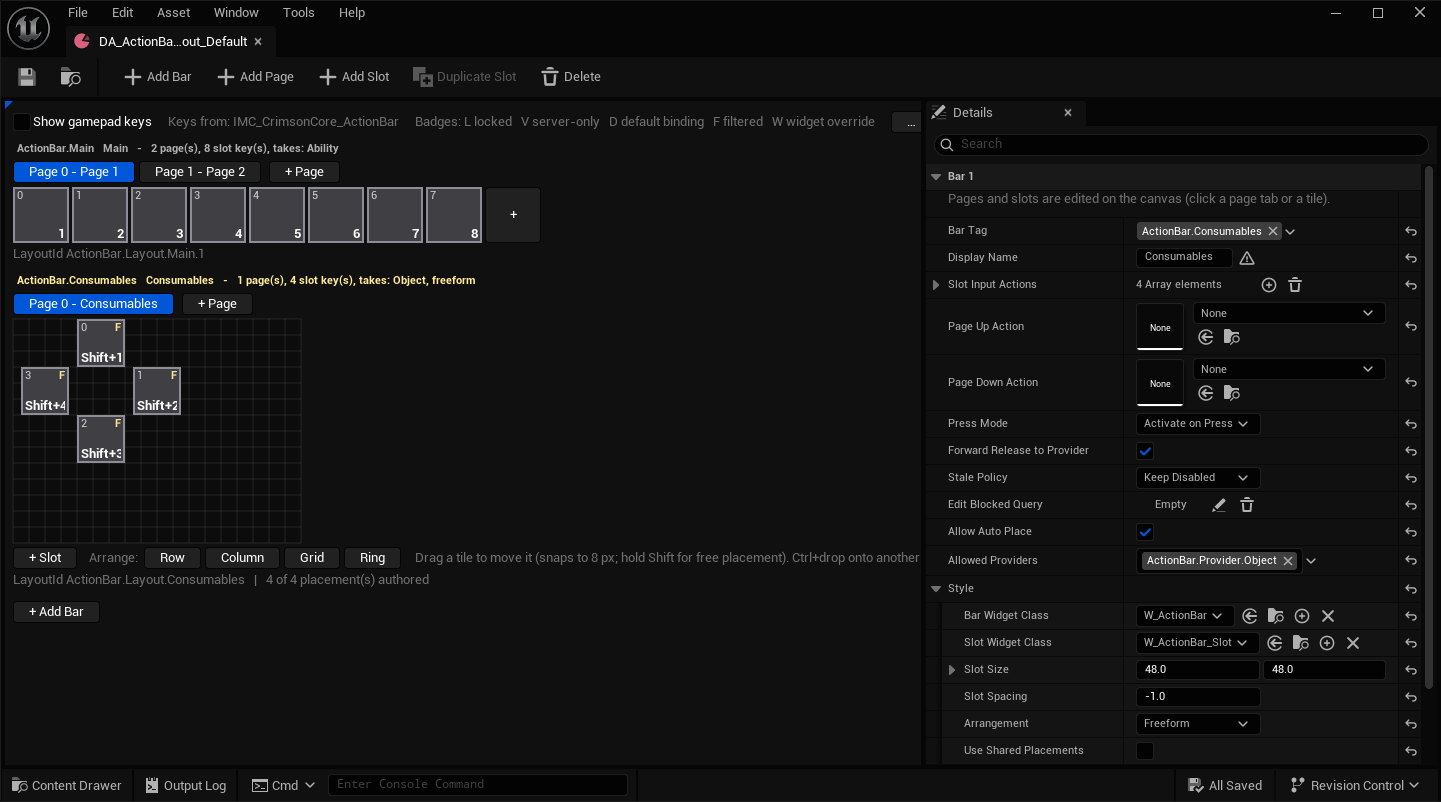
Each bar's Arrangement is Flow, where the widget's panel orders the slots (the cheap default), or Freeform, where every slot sits at an authored position on a canvas. Arrange: Ring turns four slots into the soulslike cross and five into a pentagon.
- Flip a bar to Freeform and nothing moves until you move it
- Dragging a tile snaps to 8 px as one undoable edit
- Any single slot overrides size, Z order and widget class, so a bigger centre slot is one row
- Placements are per bar and index-aligned with the keys, so a stance page can never reshuffle the shape
Widgets read a snapshot, and nothing else
A slot widget binds four delegates and reads FCrimsonActionBarSlotState. It never touches the ability system or the inventory, so the same widget serves abilities, items and macros alike.
OnSlotChangedcarries identity edges: bound, cleared, stale, locked, keybind textOnSlotLiveStateChangedcarries live edges only (enabled, cost, cooldown, charges, count, active), never per frame- Cooldown sweeps interpolate from the snapshot's end times on your own tick rather than polling the component
Every player edit is validated on the server
Every client-originated write travels the store's Server_ RPCs, and the registered validators run on arrival: slot exists, not locked, not server-only, bar not edit-blocked, payload is the provider's own struct, binding passes the slot filter.
- The same validator pre-flights on the client, so
CanAssignBindinggives the exact reason the server would - A bar can narrow its
AllowedProviders: "This bar does not take that kind of thing" - Bars-locked toggle is a client-local UX guard against accidental drags; it protects nothing
Bars arrive through a game feature action
UCrimsonGameFeatureAction_AddActionBars hands a layout to a controller on the authority when it becomes ready, then raises OnBarWidgetsReady so your HUD places each bar's widget. With CrimsonCore they land at CrimsonUI extension points on their own.
- Optionally adds the two components to a class that lacks them
- Everything is keyed by
BarTagand extension point tag, so two features can each add bars without colliding
Technical details
- Engine
- UE 5.8
- Tested platforms
- Windows
- Blueprint-ready
- Yes
- C++ required
- No
- Network replicated
- Yes
- Dependencies
- GameplayAbilities, GameplayTasks, GameplayTags, EnhancedInput, InputCore, CommonInput, CommonUI, GameFeatures, ModularGameplay, DeveloperSettings, NetCore, UMG
Frequently asked questions
Does it ship widgets I can drop on my HUD?
Do I need the Gameplay Ability System?
UAbilitySystemComponent, so ability slots need GAS. Bars, pages, the store, the object provider and the sequence provider all work without it: a consumables strip or a macro bar needs no ability system at all. On a stock ASC, ability slots activate by gameplay event or TryActivateAbility, and the engine's CheckCost grays out what the player cannot afford. With CrimsonAbilitySystem and CrimsonCore, slots also get icons from display data, Tap/Hold/Toggle routing, charges and a modeled global cooldown.Do I need C++ to use it?
FCrimsonActionBarIntegrationHooks that place bar widgets and customize keybind text, and making a controller a ModularGameplay receiver for the game feature action. A Blueprint-only project sets the layout on the component and puts the bar widgets in its own HUD.How does it behave in multiplayer?
Does it depend on other Crimson plugins?
ICrimsonSlotBindingPresentable on your abilities and items and ICrimsonSlotBindingObjectResolver on your container, and subclass the provider adapters for your ability system, and slots light up with real names, icons, charges, costs, stock counts and Tap/Hold/Toggle semantics. Implement none and it falls back to stock GAS and stock Enhanced Input, and shows less. CrimsonCore, the free full-suite integration layer (it requires every Crimson plugin), wires all of this automatically for CrimsonAbilitySystem, CrimsonInventory, CrimsonInput chord keybinds and CrimsonUI extension points. Owning another Crimson plugin without CrimsonCore connects nothing by itself.Can other UI share the same bindings?
LayoutId reads the same bindings. The drop path is not bar-specific either: give your drag operation one FCrimsonSlotBinding field and the same slot widget accepts drops from a picker or a spellbook. CrimsonUI's radial wheel keeps its own bindings; with CrimsonCore it can offer this plugin's providers as wheel entries.One bar, eight keys, replicated, in about fifteen minutes
The Quick Start takes an empty project to eight ability slots on keys 1-8, editable by the player, replicated, with a slot widget bound to it. Stance pages, freeform shapes, vehicle bars and your own providers are one how-to further.
Pricing
CrimsonActionBar is sold on Fab under Epic’s two standard licenses. Both include the full plugin, source, and updates.
Completes your setup
Each Crimson plugin runs standalone, so add only what your game needs:
A full Gameplay Ability System layer for UE5.
- Custom ASC & Abilities
- Slot-Based Augments
- Modifiers & Phases
- Graph-Based Combos
Layout-agnostic, fully replicated inventory with bags and containers.
- Pluggable Topology
- Runtime Constraints
- Scoped Containers
- No RPCs to Write
Game-agnostic CommonUI foundation for menus and HUDs.
- Layer & Dialog System
- Activatable Widgets
- MVVM Base Classes
- World-Space Indicators
Game modes composed from data, not GameMode C++.
- Experience Assets
- GameFeature Actions
- Replicated Load States
- Shared Action Sets
- Front-End Descriptors