Game-instance-driven loading screens that show and hide themselves. No manual Show/Hide calls, ever.
Utility · Loading · Unreal Engine 5
Loading screens that just work: automatic, frame-accurate, zero glue code.
A UGameInstanceSubsystem evaluates 18 conditions every frame (world validity, travel, missing player controllers, a shader-precompile gate, your readiness votes) and shows or hides the loading screen for you. It blocks input in packaged builds and restores everything on hide. You write a widget; it handles the rest.
Why CrimsonLoadingScreen
Everything a shipping loading screen needs: condition-driven, performance-aware, and fully Blueprint-readable.
Automatic show & hide
The subsystem checks 18 conditions every frame (null world, un-replicated GameState, LoadMap, pending or seamless travel, missing player controllers) and drives visibility itself. No manual Show/Hide calls, and a pure getter tells you in plain English which condition is holding it up.
Hold it until *you* are ready
Create a UCrimsonLoadingProcessTask with a reason string and the screen stays up until you Unregister it. That is the Blueprint path, from any graph. In C++, implement ICrimsonLoadingProcessInterface instead; the manager polls it automatically on the GameState, every local PlayerController and their components.
Performance hooks and input blocking
On show it switches FShaderPipelineCache to Fast batch mode, disables world rendering and suspends the hitch heartbeat, then restores everything on hide. A hold delay lets texture streaming catch up, and a Slate input pre-processor eats all input in packaged builds, never in PIE.
It waits out the shader compile too
A PSO gate holds the screen while Unreal precompiles shaders after a game or driver update, handing your widget an Optimizing shaders 42% figure. A grace period keeps the panel off an ordinary boot. Three modes: block, trickle behind a menu, or never block.
Weighted tips & background pools
Drive tip text and background materials from UDataAsset collections: weighted random selection with optional GameplayTag category filtering, and a pool of soft-referenced backgrounds picked per load. Both are chosen before the widget constructs, so a single read in Construct is always correct.
Debug tooling for fast iteration
CrimsonLoadingScreen.AlwaysShow 1 pins the screen up while you build the widget; LogLoadingScreenReasonEveryFrame prints why it is up; ShaderPrecompile.SimulateSecs fakes a precompile batch so the shader UI can be authored in PIE; and a non-shipping -NoLoadingScreen flag turns the whole thing off.
A closer look
Install once, then forget it exists
Tick CrimsonLoadingScreen in Edit → Plugins, point a setting at your UUserWidget, and you're done. No other Crimson plugin is needed. Blueprint projects edit no .uproject or .Build.cs. The manager starts with the game instance and never needs a manual call.
- Dedicated servers create no widget and tick nothing
- Leave the widget unset and you get a bare
SThrobberplus an error in the log
Keep the screen up while your data arrives
Built-in conditions cover engine travel; your game covers everything else. A GameState component can hold the screen until all players are ready; a client PlayerController can wait on its initial inventory sync.
- In Blueprint, create a
UCrimsonLoadingProcessTaskwith a reason and callUnregisterwhen the work finishes - Promote the task to a variable: the manager holds it weakly and a dropped reference releases the hold
- In C++, implement
ShouldShowLoadingScreen()and fillOutReason - Make sure the vote can end: a condition that never clears is a permanently black screen
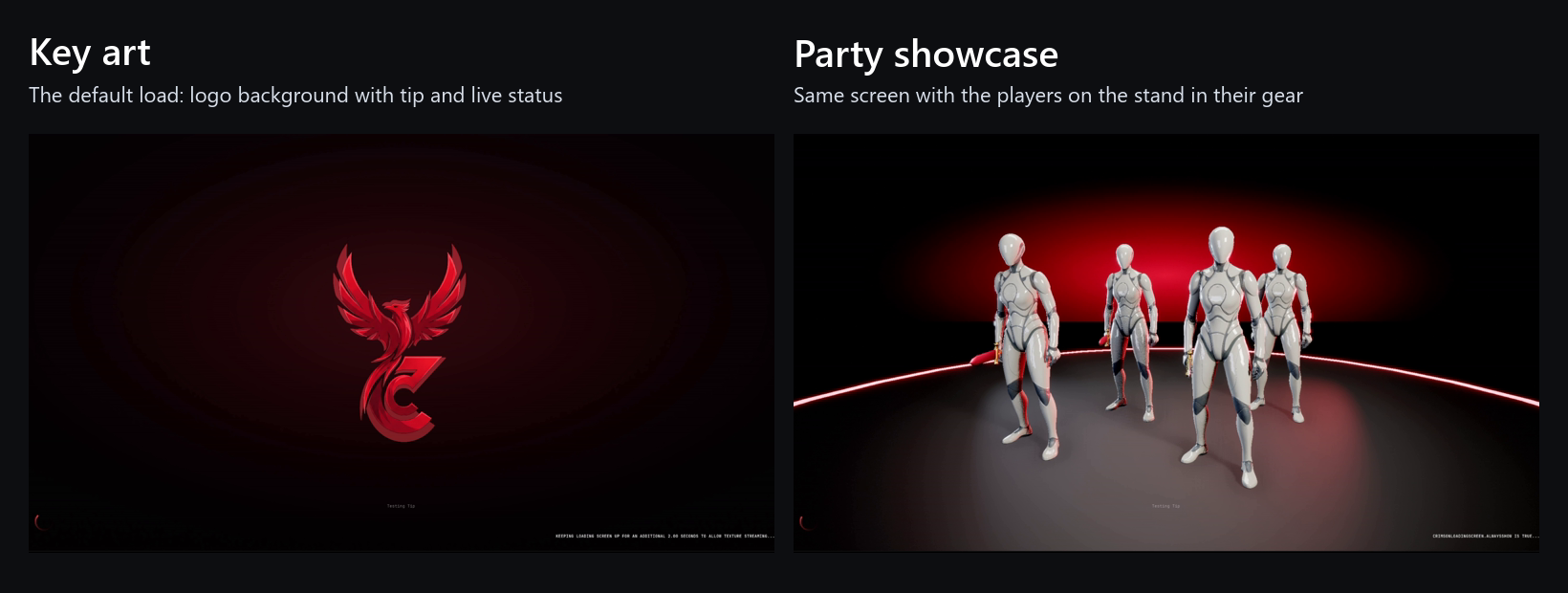
Show off the player's character while they wait
Your game describes the player's build through ICrimsonLoadingCharacterProvider (meshes, materials, an anim class, plus mounts, pets and props) and registers it with UpdateCachedCharacterInfo. Registering is the only way character data reaches the screen, so a half-initialised pawn never shows someone else's character.
- Registration outlives every travel, so a load with no reachable pawn still showcases
- A director implementing
ICrimsonLoadingCinematicInterfacedresses a pre-placed stand from that snapshot - An optional
SceneCapture2Dfeeds a live render target into the widget background, never a stale frame
Style one specific load without touching Project Settings
Set Next Load Presentation carries four independent overrides for the very next screen. Anything you leave unset keeps its project-settings behaviour, and the presentation is consumed when that screen hides, unless you ask for it to persist.
- Suppress the character showcase for a cinematic travel
- Force the destination's key art instead of a random background
- Swap the whole widget class
- Restrict tips to one category
Technical details
- Engine
- UE 5.8
- Tested platforms
- Windows
- Blueprint-ready
- Yes
- C++ required
- No
- Network replicated
- No
- Dependencies
- GameplayTags, UMG, Slate, PreLoadScreen, RenderCore, RHI
Frequently asked questions
Do I need C++ to use it?
UCrimsonLoadingScreenManager; all settings live in Project Settings → Crimson → Crimson Loading Screen; the character-provider and cinematic interfaces are Blueprint-implementable; and UCrimsonLoadingProcessTask covers holding the screen. The only C++-only piece is ICrimsonLoadingProcessInterface (a plain virtual, not a BlueprintNativeEvent), and the process task does the same job from Blueprint.Do I have to call Show or Hide manually?
Can I keep the screen up while my own data loads?
UCrimsonLoadingProcessTask, keep the returned object in a variable, and call Unregister when your async work completes; the manager holds it weakly, so dropping the reference silently releases the hold. In C++ you can implement ICrimsonLoadingProcessInterface on a GameState, PlayerController or one of their components (polled automatically), or register any other object with RegisterLoadingProcessor(). All votes are polled every tick and the screen hides only when every one of them clears.Will it make an ordinary boot slower?
Does it depend on other Crimson plugins?
.uplugin enables no other plugin. Everything on this page works with it alone.What do I need to run it?
Set Next Load Presentation does the same job from your own travel code.Ship a polished loading screen this afternoon
Enable the plugin, point it at a widget, and the subsystem handles show, hide, input blocking, and performance tuning for you. Add tips, backgrounds, a per-load presentation and a character preview when you're ready.
Pricing
CrimsonLoadingScreen is sold on Fab under Epic’s two standard licenses. Both include the full plugin, source, and updates.
Completes your setup
Each Crimson plugin runs standalone, so add only what your game needs:
Layout-agnostic, fully replicated inventory with bags and containers.
- Pluggable Topology
- Runtime Constraints
- Scoped Containers
- No RPCs to Write
Replicated, GAS-native skill trees with a two-graph editor.
- Two-Graph Editor
- Material Splines
- Server-Authoritative
- Atomic Respec & Loadouts