The GAS interaction mechanism layer: data-driven scan tasks for cursor or forward aim, a server-side ability granter, trigger statics, and project-wide scan settings. Author one small interact ability; the rest is done.
Free · Interaction · Unreal Engine 5
Every "Press E" in your game. Scanning, filtering and authority, handled.
The interaction layer for GAS projects: ability tasks detect ICrimsonInteractableTarget actors by cursor or forward trace, filter options by what players can activate, and keep each option's ability granted on the server. It ships no abilities, widgets or input bindings; you author roughly 100 lines and keep them.
Why CrimsonInteraction
Detection, filtering, granting, and firing are done; the small interact ability on top stays yours.
Two scan tasks, two camera styles
UCrimsonAbilityTask_WaitForInteractableTargets_TopDownTrace deprojects the cursor to the ground for Diablo-style games; _SingleLineTrace traces forward through the camera for FPS/TPS. Swap one task call to change strategy, or subclass the base task and bring your own trace.
Options filtered by what you can activate
Scan tasks are UAbilityTasks spawned from your interact ability, and options are filtered by CanActivateAbility, so the prompt only shows what the player can perform: no stale or impossible options. Survivors arrive in priority order, so index 0 is reliably the focused target.
Granted on the server, fired by replicated handle
UCrimsonAbilityTask_GrantNearbyInteraction runs on the server only, granting each nearby option's abilities and revoking them when the interactable leaves range. On press, TriggerInteractionOption fires that ability by replicated spec handle, for normal GAS prediction and server authority; a press before the grant replicates is safely ignored.
Requirements are objects, not code in the actor
Attach UCrimsonInteractionCondition objects to an option: a gameplay tag query, or And/Or/Not compositions, inline or as a Condition Set asset. A failure hides the option or keeps it on the prompt as a met/unmet checklist, and the handler re-checks on the server.
Instant, hold & channel: all data
An option's activation shape lives in its data: InputType = Instant fires on press, Hold with an InputHoldDuration confirms after a timed hold, and an InteractionActionAbility starts a timed channel like mining or reviving. UCrimsonInteractionDurationContext carries progress to your UI.
Zero collision setup to start
The default Interaction Trace Channel is Visibility, so any actor with default collision is detected immediately. When you outgrow that, UCrimsonInteractionSettings centralizes channel, profiles, range, rate, and debug, and the plugin ships Interactable_OverlapDynamic / Interactable_BlockDynamic profiles for a dedicated-channel setup.
A closer look
The complete loop in one Quick Start
Walk up to a chest, press interact, and it reacts, in singleplayer and multiplayer, with CrimsonInteraction alone, no other Crimson plugin. You author two abilities (a handler and an interact ability), the wiki walks you through every line, and they're yours to keep and extend.
Holds and channels are data, not input triggers
Hold timing lives in ability timers, never in an Enhanced Input Hold trigger: per-option durations are data, and the input layer can't know what you're aiming at. Holding fills the target's progress and releasing early cancels; channels pre-grant their action ability automatically.
- Progress reaches the target itself via
NotifyInteractionProgress - HUD widgets bind
OnProgressChangedon the duration context - With CrimsonCore, progress is also re-published on the message bus
Which option fires is yours to decide
By default a press acts on the focused target: closest to the cursor, or first along the aim. Implement ICrimsonInteractionInstigator and your press path asks ChooseBestInteractionOption for the winner, so "prefer the quest target" is one hook, not a rewrite of the press path.
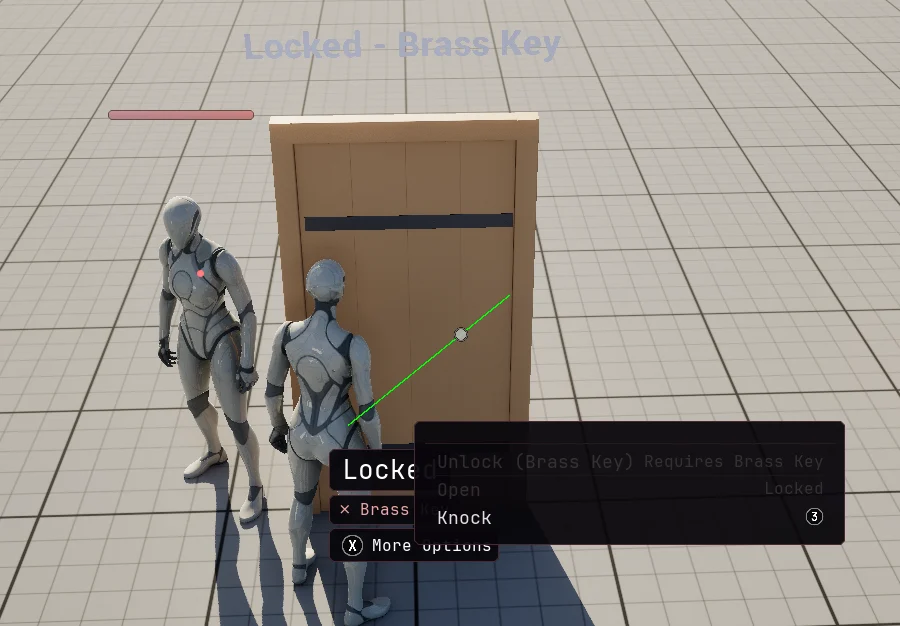
ICrimsonInteractionInstigatorgoes on your pawn or controller- With CrimsonCore and CrimsonUI, every option also appears in a server-validated context menu
Built for multiplayer from the first trace
Scanning runs on the owning client to drive the local prompt; granting runs on the server only; firing goes through GAS by replicated handle, so prediction and authority just work.
- Out-of-range grants are revoked on the server
- Aim helpers tolerate AI and non-locally-controlled avatars, so a listen-server host running multiple pawns won't crash
Technical details
- Engine
- UE 5.8
- Tested platforms
- Windows
- Blueprint-ready
- Yes
- C++ required
- No
- Network replicated
- Yes
- Dependencies
- GameplayAbilities, EnhancedInput, GameplayTasks, GameplayTags, UMG
Frequently asked questions
Do I need the Gameplay Ability System?
UAbilityTask spawned from a running UGameplayAbility, options are filtered by CanActivateAbility, and interactions fire as gameplay events on an ASC. There is no non-GAS fallback. The upside: it works with plain UGameplayAbility subclasses; you don't need CrimsonAbilitySystem or any particular GAS base class.Do I need C++ to use it?
FCrimsonInteractionOptionBuilder for building options natively.Does it work in multiplayer?
GrantNearbyInteraction early-outs unless it has authority, and TriggerInteractionOption fires by replicated handle so the granted ability runs with normal GAS prediction and server authority.Does it depend on other Crimson plugins?
GameplayAbilities and EnhancedInput. The whole contract ships in this plugin: ICrimsonInteractableTarget, ICrimsonInteractionInstigator, FCrimsonInteractionOption, the query and the conditions. Being interactable needs nothing else installed.What does CrimsonCore add?
Detect, prompt, press, react. Today.
The Quick Start takes you from an empty GAS project to a chest that reacts to the interact key, in singleplayer and multiplayer, in roughly 100 lines you own. Holds, channels, and progress prompts are one how-to further.
Ready for more? Add a premium system
Every premium system runs on its own, so add only the ones your game needs.
Layout-agnostic, fully replicated inventory with bags and containers.
- Pluggable Topology
- Runtime Constraints
- Scoped Containers
- No RPCs to Write
Equipment slots that grant abilities and spawn gear.
- Slot-Based Equipping
- Grants Abilities & Effects
- Spawns Visual Actors
- Interface-Decoupled