Floating combat text done right: styled by tags, moved by curves, placed where you want it, pooled, and replicated for multiplayer.
Gameplay · Combat Text · Unreal Engine 5
Damage numbers that pop, without the frame drops.
Floating combat text for damage, healing and custom values. The server broadcasts once; each client runs its own visibility chain, resolves a style from a hierarchical tag registry, plays a curve-authored motion preset and recycles a pooled widget. Combat reads clearly and never hitches under a flurry of hits.
Why CrimsonCombatText
Everything you need to show numbers above actors: pooled for performance, styled by tags, placed by policy, and correct in multiplayer.
Hierarchical tag-to-style registry
A UCrimsonCombatTextRegistry maps gameplay tags to styles hierarchically: a hit tagged Damage.Fire.Burn falls back to Damage.Fire, then Damage, then DefaultStyle. Author only the specificity you care about; one Damage row already covers every damage type. AdvancedRules tag queries are the escape hatch.
Modifiers instead of combinations
Conditions that cut across types (Crit, Blocked, Absorbed) are Modifiers that layer onto whichever style matched. One can wrap the text, retint it, punch its scale or swap the motion preset, so a registry grows as styles plus conditions, not styles times conditions.
Placement decides where text lands
Where a pop appears is a UCrimsonCombatTextPlacement row a style points at: over the target, below it, a fixed HUD area, or pinned to a target frame or per-enemy nameplate. Each carries a Fallback chain: a hidden health bar's pop reverts to the actor.
Pooled views, capped and recycled
The subsystem simulates every live instance in one loop, then hands the whole frame to a renderer. Views are pooled and recycled, never destroyed mid-session; MaxActiveTexts caps concurrent pops and retires the oldest first; creation is throttled per frame when the pool runs dry.
Multiplayer by design
A UCrimsonCombatTextReplicationComponent on your GameState sends each event over unreliable RPCs: one multicast, or per-client delivery when ServerCullDistance is set. BroadcastCombatText validates authority itself, so it is safe to call from shared code like an AttributeSet's PostGameplayEffectExecute.
Curve-authored motion presets
Motion lives in a shared UCrimsonCombatTextMotionSet: ten editable built-in presets (FloatUp, ArcOut, CritPunch, Shiver and more) plus your own. Curves run over a normalized 0 to 1 lifetime, so motion completes exactly at Duration, and changing the duration restretches the shape without redrawing a curve.
A closer look
One server event, every client renders locally
On the server, build a FCrimsonCombatTextEvent and call BroadcastCombatText from an AttributeSet's PostGameplayEffectExecute, an ability, or Blueprint. Each client's subsystem filters, styles, places and displays from there.
- Validates authority itself, so the call is safe from shared code
- Spawn location comes from the target's
UCrimsonCombatTextTargetComponent: a socket, an offset, or 100 cm above the root - Never created on a dedicated server or in an editor preview world
Styled by tags, moved by curves
Add a new look by adding a row: no branching code, no per-combination explosion. Editing one preset restyles every effect that references it.
- Fixed resolution order: advanced rules, hierarchical tag match, default style, modifiers in
ApplyOrder, motion preset, placement - Advanced rules run first only if you authored any
Bursts that read instead of blur
A deterministic spread fan deflects concurrent hits to alternating sides: slot 0 straight up, then out to FanWidth, with optional jitter if perfect regularity looks mechanical.
AggregationWindowfolds repeat hits on the same target and style into one climbing number- Scopes accumulate everything landed during a stagger or posture break into one summary pop when it ends
- Scopes open themselves from a GAS tag, or you call begin and end yourself without GAS
Every player sees their own fight
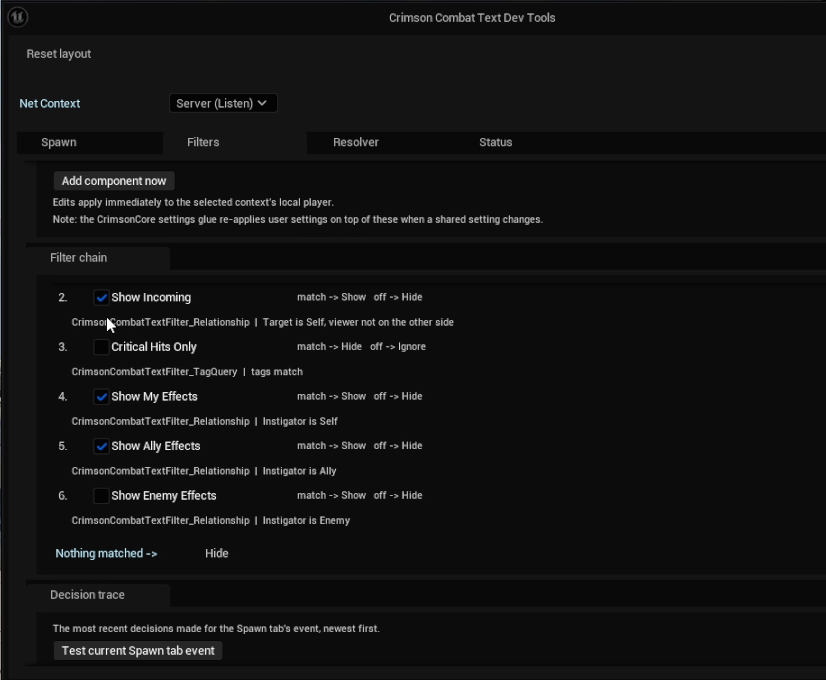
Visibility is an ordered chain of rules in a UCrimsonCombatTextFilterSet data asset, not a fixed list of toggles: rows are evaluated top to bottom and the first one with an opinion wins, so the order is the policy.
- Seven built-in rows ship: distance cap, healing, incoming, crits-only, own, ally, enemy
- A rule of your own is one
Matchesoverride in Blueprint - With CrimsonCore, every row becomes an options-screen setting automatically; standalone, the per-player overrides are yours to wire
IsActorFriendlyis the single hook that makes Self / Ally / Enemy mean something in your project
The dev tools tell you why a number did not appear
An editor-only window (Tools → Crimson Combat Text, or Crimson.CombatText.DevTools in PIE) fires test broadcasts at any pawn from any instigator, bursts 200 at once to stress the pool cap, and live-edits the local filters.
- Resolver tab shows which registry row won, which modifiers applied and which placement resolved
- Filters tab prints a decision trace naming the row that hid an event
- Status tab reports loaded assets, the GameState component and live active/pooled counts
- Picks which PIE world it inspects, so you can compare what each client sees
Technical details
- Engine
- UE 5.8
- Tested platforms
- Windows
- Blueprint-ready
- Yes
- C++ required
- No
- Network replicated
- Yes
- Dependencies
- GameplayAbilities, Niagara, SlateIM, GameplayTags, UMG, DeveloperSettings
Frequently asked questions
Do I need C++ to use it?
BroadcastCombatText is BlueprintCallable. The two extension points are BlueprintNativeEvents as well: a custom visibility rule is one Matches override on a Blueprint child of UCrimsonCombatTextFilter, and a custom placement is AcquirePlacement / UpdatePlacement on a Blueprint child of UCrimsonCombatTextPlacement, with the projection maths exposed as Blueprint nodes. The C++ snippets in the docs show the common GAS integration point, but they are optional.Does it depend on other Crimson plugins?
IsActorFriendly, so it needs no team plugin. With CrimsonCore, filter rows become options-screen settings and show your project's tag labels automatically; standalone, rows show each filter's DisplayName, or bind TagLabelResolver yourself.Does it work in multiplayer?
ServerCullDistance and delivery switches to per-client so distant players never pay for pops they cannot see, with one caveat: the component's OnCombatTextReceived delegate only fires on the multicast path, so custom listeners bound to it are skipped once culling is on. For purely local use, call RequestCombatText on the subsystem directly.Will hundreds of numbers tank my framerate?
MaxActiveTexts caps concurrent pops and retires the oldest first, and creation is throttled per frame when the pool is exhausted, and the subsystem never runs on dedicated servers or in editor preview worlds. For ARPG or bullet-hell densities there is an optional batched Niagara renderer that draws every number from one system. Be clear-eyed about that path: it strips rich text, {Prefix} and {Custom}, and it needs a Niagara system and a glyph-atlas material you author yourself against a documented parameter contract, because neither can ship inside the plugin. If it is misconfigured the subsystem falls back to the widget renderer with a warning rather than going blank.Where can the numbers appear?
Does it ship example content?
Make every hit land on screen
CrimsonCombatText is quick to wire up: enable the plugin, add the replication component to your GameState, and broadcast from the server. Demo content ships pre-wired, so numbers pop before you author anything. The Quick Start walks through it.
Pricing
CrimsonCombatText is sold on Fab under Epic’s two standard licenses. Both include the full plugin, source, and updates.
Completes your setup
Each Crimson plugin runs standalone, so add only what your game needs:
Data-driven hit detection for melee, area, hitscan and projectiles.
- GAS Target Data
- Interpolated Sweeps
- Composable Filters
- Hit Zones
- Pool-Ready Projectiles
A full Gameplay Ability System layer for UE5.
- Custom ASC & Abilities
- Slot-Based Augments
- Modifiers & Phases
- Graph-Based Combos
Replicated, GAS-native skill trees with a two-graph editor.
- Two-Graph Editor
- Material Splines
- Server-Authoritative
- Atomic Respec & Loadouts