A data-driven settings framework: take a complete Video / Audio / Mouse & Keyboard / Gamepad / Gameplay menu straight out of the box, or declare your own options in a data asset and persist them per player with zero glue.
Framework · Settings · Unreal Engine 5
The settings menu every game needs. Declared in data, not code.
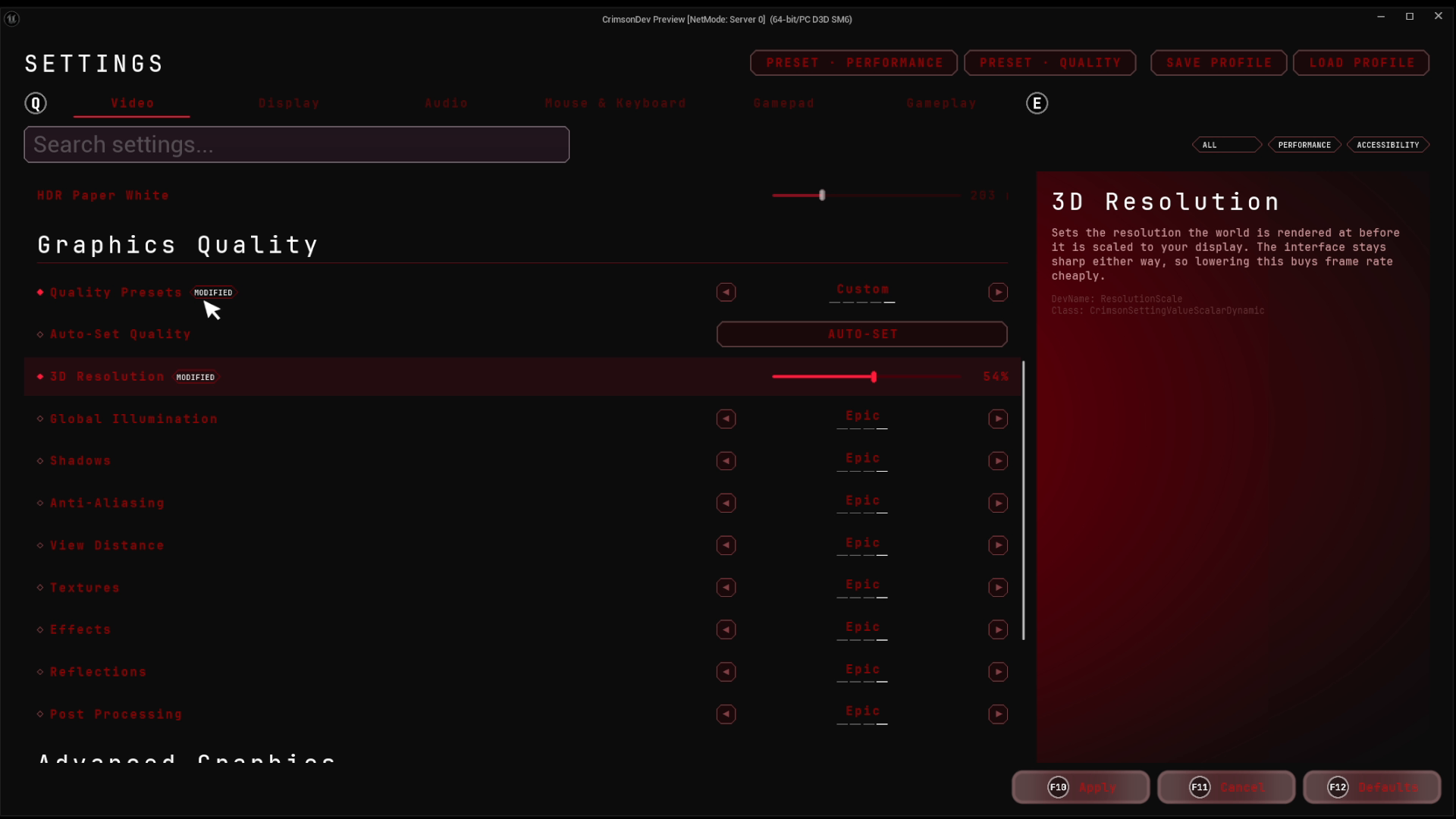
A Crimson port of Epic's GameSettings architecture. Call five builders for a complete options menu with nothing authored, or declare your own in a data asset and tick one box to persist them per player. Search, presets, profiles, live preview, key rebinding and a first-run wizard ship in the box.
Why CrimsonSettings
Declare, persist, present: three layers that stay independent, so adding an option is a data-authoring task, not a plumbing one.
A complete options menu, nothing authored
Five builders produce Video, Audio, Mouse & Keyboard, Gamepad and Gameplay tabs: resolution, quality presets, HDR, frame-rate limits, volume mix, sensitivity, language, a rebind list per device. Each returns its collection, so adding your own row to a shipped tab is one call.
Options are data assets, not code
Author sections and entries (scalar sliders, discrete selectors, action buttons) in a UCrimsonSettingsDataAsset with its own tree editor: reorder, duplicate, and duplicate-DevName validation while you author. A Blueprint UCrimsonSettingRegistry turns the asset into live settings with one Populate From Data Asset call.
Persist per player with zero glue
Tick Persist To Shared Store and an entry's value saves into a Key → value store on the per-player save: no getter, no setter, no delegate. UCrimsonSharedSettingsSubsystem loads it, auto-saves on a debounce and broadcasts OnSettingChanged. Machine-tied state like resolution goes to UCrimsonSettingsLocal instead.
Or bind straight to game code
When a setting must drive live state, like a volume or a quality preset, handle K2_BindSetting and wire the _BP value classes' get/set delegates to your functions. In C++, UCrimsonSettingValueScalarDynamic resolves reflected getter/setter paths for resolution, scalability and gamma. Persisting and binding are independent choices.
Key rebinding, scoped per device
Rebindable actions come straight from Enhanced Input's UPlayerMappableKeySettings, no second list to maintain. Keyboard and gamepad get independent rows per action, with primary/secondary pills and reset-to-default. One setting picks full names, glyphs or abbreviations for every pill. Chord capture comes with CrimsonCore.
A CommonUI screen with the AAA flow
UCrimsonSettingScreen and UCrimsonSettingPanel bring search, tag filtering, dirty/default indicators, conflict warnings and performance-impact badges. On top: one-click presets, named profiles that snapshot every setting, live preview that commits only on Apply, keep/revert confirmation countdowns, a restart-required hook, a hardware benchmark and an optional first-run wizard.
A closer look
From an empty project to a persisting settings screen
Enable the plugin and point GameUserSettingsClassName at UCrimsonSettingsLocal in DefaultEngine.ini. After that it is data: author a data asset, populate a Blueprint registry from it, subclass UCrimsonSettingScreen and push it onto a UI layer.
- The
.iniline is the one step with no in-editor equivalent, and the plugin asserts without it - Tick Persist To Shared Store on each entry and values survive relaunch per player, nothing else wired
Any plugin can add settings without touching CrimsonSettings
The keyed store holds opaque Key → value pairs, so exposing another system's options is pure data authoring. Neither plugin gains a dependency on the other: CrimsonSettings never names a camera or gameplay concept.
- Give each entry a namespaced Storage Key like
Gameplay.AimSensitivity - A consumer module that sees both plugins reads the keys and applies them
- Re-apply on
OnSettingChangedso live edits take effect
The Apply flow players expect from a shipped game
With live preview on, dragging a slider updates the UI but commits nothing until Apply. Cancel's rollback comes free from the change tracker.
- Flag resolution or display mode Requires Confirmation and a keep/revert countdown fires after Apply, reverting on timeout
- Restart-required settings raise
K2_OnRestartRequiredfor your banner
Calibration the player judges live
The Video tab ships two action rows: a full-screen gamma screen and a title-safe frame screen. Both adjust live on the mouse wheel and gamepad right stick, and Done writes through the registry so Apply lights up. You author the Widget Blueprints; the behavior ships.
- Gamma is clamped 1.0 to 3.0, wider than Lyra's slider on purpose
- The left stick stays with CommonUI navigation, so Back and Done remain reachable on a pad
- On Windows the safe-zone row hides itself, because the platform reports a zero title-safe margin
Performance stats on the HUD, picked per stat
With CrimsonCore, one call hangs a Performance Stats page under Video → Display: eighteen stats, each set to None, Text Only, Graph Only or Text and Graph, and the HUD readout follows the choice while the menu is still open.
- CrimsonCore ships the page: call
AddPerformanceStatsPagefrom your registry - Standalone, hang your own page under any ready-made tab with
K2_RegisterSettingInParent - The stat widgets themselves come from CrimsonUI
Technical details
- Engine
- UE 5.8
- Tested platforms
- Windows
- Blueprint-ready
- Yes
- C++ required
- No
- Network replicated
- No
- Dependencies
- CommonUI, EnhancedInput, AudioModulation
Frequently asked questions
Do I need C++ to use it?
K2_BindSetting delegates. Two exceptions worth knowing before you buy: registering the GameUserSettings class is a DefaultEngine.ini line with no in-editor equivalent, and the advanced tier (Dynamic value classes with reflected data sources for engine-level settings) is C++. For keybind glyphs the docs also recommend one UCommonActionWidget subclass so a pill can pin itself to a device and read the Enhanced Input user settings while a menu is open.Does it work in multiplayer?
UCrimsonSettingsShared saved per local player, and nothing in either storage class replicates. Where a preference affects gameplay, send it to the server through your own validated path; you shouldn't drive authoritative gameplay from a client's preference value, and the plugin doesn't pretend otherwise.Does it depend on other Crimson plugins?
CommonUI, EnhancedInput and AudioModulation. The screen pushes onto whatever UI stack you run, and the shipped keybind rows rebind plain keys through Enhanced Input's user settings.What does CrimsonCore add?
KeybindingSettingClass and the keybind row virtuals, K2_RegisterSettingInParent for extra pages, and the UCrimsonSettingsShared getters.Can other plugins or my game add settings without modifying CrimsonSettings?
UCrimsonSharedSettingsSubsystem. A consumer module that depends on both plugins applies the values, which is the only place the two names ever meet.How stable are the setting names?
DevName the way you would a database column. It is the identity used by the keyed store's storage key, a saved profile's map, and a preset entry. Renaming one after players have saved settings orphans every value stored under the old name, and nothing migrates it for you. The framework does make collisions loud: duplicates are flagged in the asset editor while you author and asserted by the registry at runtime.Ship the settings menu, not the settings plumbing
Author a data asset, populate a registry, push the screen, and you have persisting per-player options in a sitting. Then layer in presets, profiles, preview, and confirmation as your game grows.
Pricing
CrimsonSettings is sold on Fab under Epic’s two standard licenses. Both include the full plugin, source, and updates.
Completes your setup
Each Crimson plugin runs standalone, so add only what your game needs:
Tag-driven Enhanced Input with GAS ability binding.
- Ability Input Binding
- Per-Player Rebinding
- Settings Modifiers
- Input Clash Analyzer
Game-agnostic CommonUI foundation for menus and HUDs.
- Layer & Dialog System
- Activatable Widgets
- MVVM Base Classes
- World-Space Indicators
Fragment-based saving: each system owns its own data.
- Independent Fragments
- No Cross-Plugin Coupling
- Blueprint-Ready